UX/UI · 2024 · WEB APP
FormuLator
an AI form generator: describe it, get a form
ROLE
UX/UI designer
TEAM
UX/UI designers, developers and two mentors
TIME
1 month · two-week Agile sprints
TYPE
Web app with an AI generator
TOOLS
Figma · Tailwind UI

01
THE BRIEF
Describe it. Get a form.
A web app that lets people create, edit, save and share forms with the help of AI. The goal was to take the whole path from an idea to a ready survey, and keep it simple enough for people with no technical background.
Instead of building a form field by field, you describe what you need in a chat. The generator proposes the structure, you adjust it, save it in My forms, share a link and look through the answers.


02
PROCESS
Two-week sprints, designers and developers side by side.
We worked in two-week Agile sprints with two mentors, a UX designer and a developer. Designers and developers worked together at every stage, from the first benchmarks to fixes after implementation.
Research: market analysis, benchmarks and inspiration. Ideas: brainstorming and “How might we?” questions. Structure: site map and user flows. Design and build: sketches, lo-fi and hi-fi mock-ups, development and fixes.
03
STRUCTURE & FLOWS
Map the paths before the pixels.
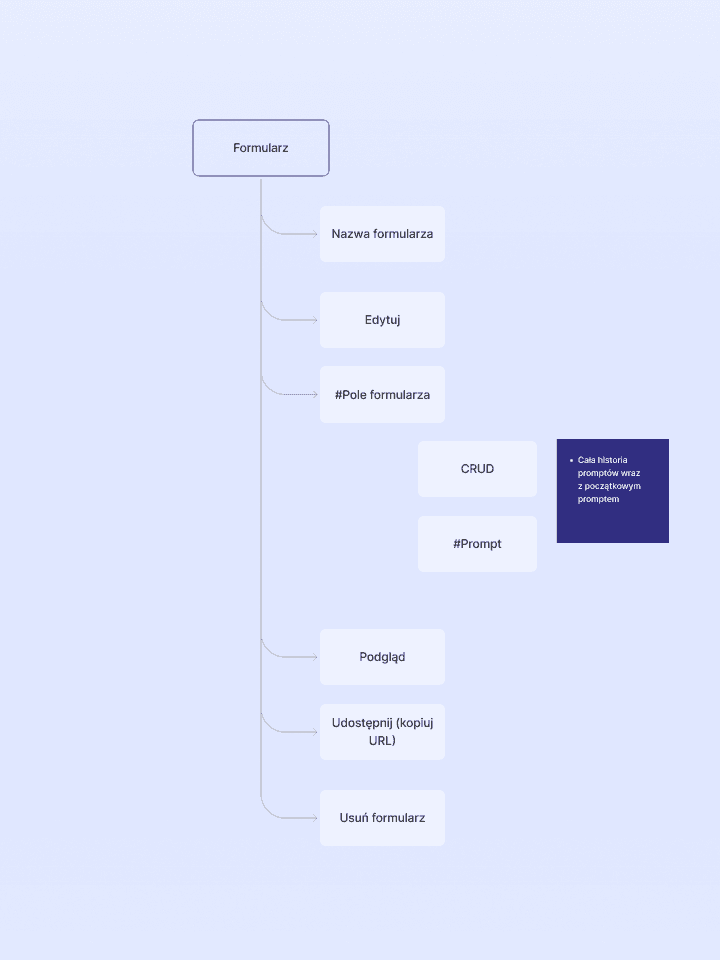
Based on the business requirements and benchmark findings, we prepared the app structure, content models and user flows. That let us plan every path in detail: from the first visit, through generating, editing and saving a form, to sharing it and reading the results.
Two key flows: a logged-in user generates a form and keeps the full history of prompts; a guest can generate and share one too. In both, the user can ask the AI to try again until the form fits.



04
VISUAL
Tailwind UI, Roboto and one strong indigo.
We designed a simple, modern interface on Tailwind UI so every function stays easy to use, also for people without a technical background.
Roboto in three weights keeps the forms calm and readable. Indigo leads the actions, greys carry the text, and a few bright accents mark statuses and charts.
#6366F1
Indigo 500
#C7D2FE
Indigo 200
#111827
Gray 900
#1F2937
Gray 800
#9CA3AF
Gray 400
#7C3AED
Violet 600
#C026D3
Fuchsia 600
#22C55E
Green 500
#FACC15
Yellow 400
#0EA5E9
Sky 500

05
HIGH-FI SCREENS
From a prompt to a ready form.
The generator builds the structure of a form from a conversation with the user, ready for editing.
The user can edit the form, save it in My forms, generate a link to share it, and browse and analyse the answers.


06
WHAT I LEARNED
Clear requirements, short loops.
The project grew both my design skills and the soft ones: clear communication in a mixed team of designers and developers, collecting and delivering client requirements, and working in Agile.
Regular reviews with the mentors kept us close to good practice and let us check our progress every sprint.
NEXT PROJECT →
AI CV Enhancer